Turning on Dynamic Pricing
Dynamic Pricing has two switches for a reason: Optimize lets the model price a listing privately first, so you can review its work before anything reaches guests. Push is the one that sends.
Open Settings and go to Listings management.
Find the listing and switch on Optimize in its Pricing cell. Confirm the dialog; nothing else is asked here. Target rent is the Expected revenue cell in this same table, and floors come from Account Setup.
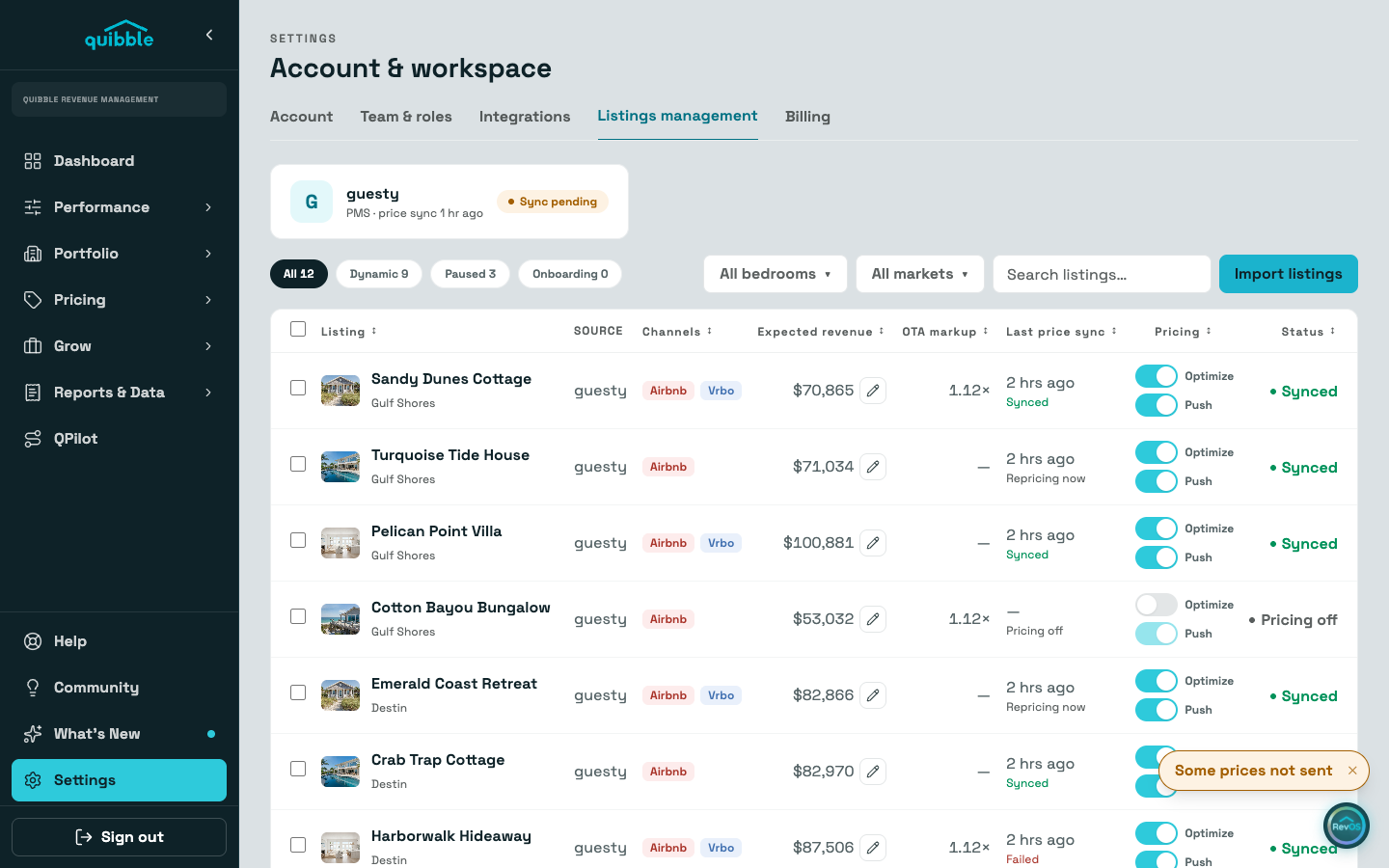
Let it process. With only Optimize on, Quibble builds the comp set and prices every night — without sending anything to your PMS.
Review the competitor selection and the priced calendar on the property’s Pricing and Comp Model tabs.
Happy with what you see? Switch on Push to start sending optimized prices to your PMS.
- Optimize alone is the safe preview: nothing is pushed until Push is on. The All / Dynamic / Paused / Onboarding chips filter the table by where each listing stands.
- The Sync Status page confirms every push after you go live.